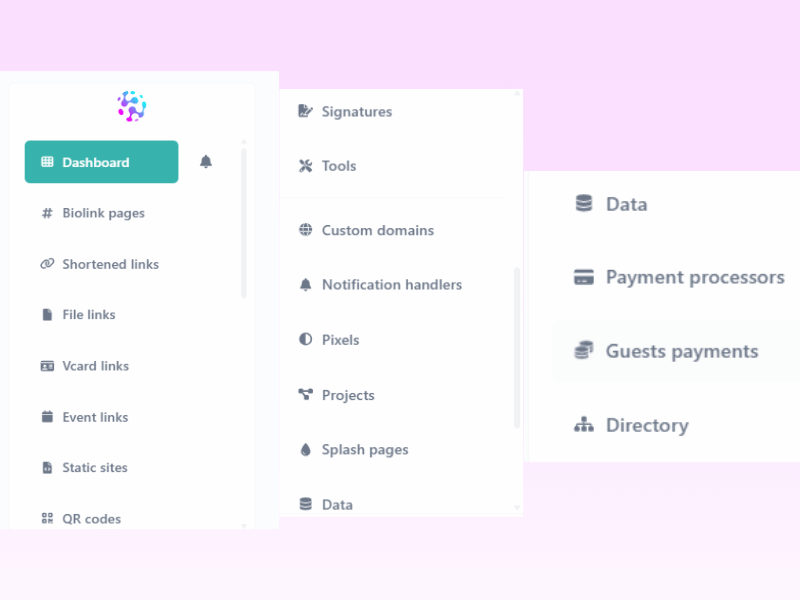
The dashboard is your main screen. It shows you a list of all your links, QR codes, and files. It also has a simple chart that shows how many people clicked your links today. This post explains what each button on your dashboard does so you can manage your
Dashboard
- Shows quick totals: Total Biolinks, Total Short Links, Total File Links, Total vCard Links, Total Event Links, Total Static Links.
- Includes analytics (clicks, views, top assets, recent activity) and account info (plan, limits, usage).
https://www.tiktok.com/@mebreqhq/video/7622416978317266194
Biolink Pages
- Build a link-in-bio mini site: buttons, text, images, video, social icons, forms, contact collectors.
- Drag-and-drop sections; publish instantly.
Shortened Links
- Create short, trackable URLs. (e.g., zlinkoo.com/xYz)
- Options: UTM tags, password, expiry, A/B, redirects, (optional) pixel attach.
File Links
- Upload files (e.g., PDF/ZIP) and share via a trackable link.
- Control access/expiry; see download stats.
vCard Links
- Digital business card links/QR.
- One tap to save contact details to the phone.
Event Links
- Event pages with title, date/time, location, description, countdown / add-to-calendar.
Static Sites
- Host static HTML pages (simple microsites/landing pages) inside Zlinkoo.
- Great for one-off promos or custom layouts.
QR Codes
- Generate QR for any asset (biolink, short link, file, event, vCard).
- Download PNG/SVG; brand with logo and styling.
Signatures
- Create branded email signatures with links/socials.
- Copy/paste into Gmail/Outlook.
Tools
- Handy web utilities (e.g., QR/Barcode reader, converters, preview helpers, etc.) to support daily marketing workflows.
Custom Domains
- Connect your own domain/subdomain for branded links and pages. (e.g., links.yourbrand.com)
- Improves deliverability and trust; avoids generic domains.
Notification Handlers
- Email/webhook (and similar) alerts for events like form submissions, payments, or other tracked actions.
Pixels
- Add tracking pixels (Meta, Google, TikTok, etc.—as available on your plan).
- Enable analytics/retargeting on selected assets.
Projects
- Folder-like organization for clients/brands/campaigns.
- Group biolinks, short links, QR, splash pages, etc.
Splash Pages
- Interstitial landing screens shown before a redirect.
- Use for branding, compliance, or promos.
Data
- Central inbox for submissions collected from your biolinks: contact forms, phone/email collectors, etc.
- Review, export, and use for follow-ups/CRM.
Payment Processors
- Connect supported gateways (availability depends on your account/region).
- Accept payments/donations/checkouts from biolinks or static sites.
Guest Payments
- Take one-off payments without requiring the payer to create an account.
- Ideal for tips, donations, simple checkouts.
Directory
- Optional public listing to make your biolink discoverable (if enabled).
- Useful for marketplaces or creator directories.